Printing Basics
Resolution
Resolution defines the quality of graphics in relation to the number of "dots", or bits or pixels the graphic has.
A high resolution graphic has more dots per inch (dpi), while a low resolution graphic has a lower dpi.
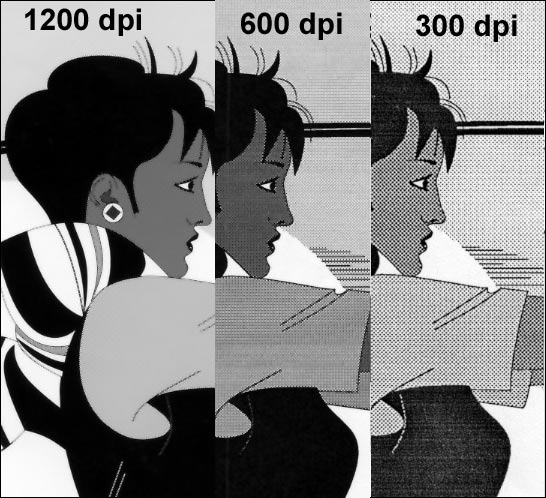
Resolution applies to both graphics designed for print (typically high resolution) or graphics created for the Web (low resolution).
Low and high resolution is also applied to printers.
A 300 dpi laser printer is low resolution, but a 2450 dpi imagesetter(high-end printer) is high resolution.
Resolution for ink-jet printers
- 720dpi
- 1440dpi
How much detail or how sharp an image can be printed depends on the resolution of the printer.
- higher the resolution, more ink that is being used.
All images for the web must be 72 dpi. Higher is NOT better for the web.
Laser Printers
A laser printer uses methods similar to a photocopier to print computer output on paper.
The toner is deposited on the paper, then fused and bonded to the paper surface with a heated roller.
Color laser printers mix several colors of toner in a multi-pass process. Laser printers have their own command language; most use Adobe's Postscript.
RAM
Random Access Memory is used in Postscript printers.
RAM is where the information is stored before the printer prints the piece.
Ink-jet printers do not have RAM because they do not use postscript.
Fonts and Postscript
OSX Font Info
Postscript is a page description language used by printing devices and was developed by Adobe.
Essentially, when you print to a PostScript printer, the printer turns your design into a series of commands.
Inkjet printers are not postscript and print a low resolution version of the image IF the image has been placed in a page layout software, i.e Indesign or Quark (you probably won't notice much of a difference if the image already looks good in the layout).
Be aware that most service bureaus prefer PostScript fonts.
Postscript fonts are considered the "Professional" fonts for high-end use when offset printing.
Basic Prepress Terms
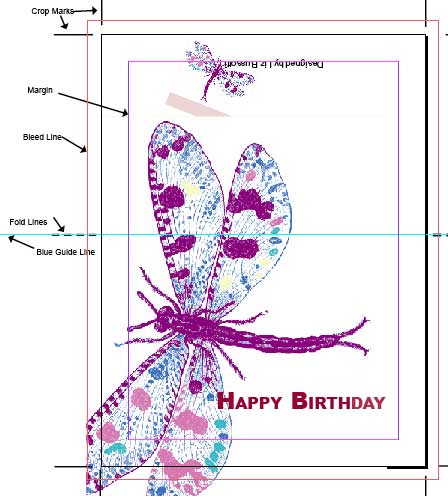
Trim line is the correct finished size of a printed piece and is indicated by the crop marks.
Bleed Line
When an image or color is designed to meet the edge of the trim size.
Printing presses cannot print right to the edge of a paper sheet.
To create that effect, a BLEED, must be set.
The printer must use a sheet which is larger than the actual trim size.
The imge to bleed is extended usually 1/16" or 1/8" beyond the trimline and must TOUCH the Bleed line. The paper is then cut to the finished trim size.
It is the designer's responsibility to set the bleed correctly. Although 1/16 is standard, different printers have different requirements.
In Indesign, set the bleed when you create the document. It can also be added in the Print diaogue box.
Speak to your printer about how much bleed he needs before you design your job.
Cropmarks are used to indicate the trim line of the final printed piece.
Cropmarks are sold black lines that are placed at all four corners of a layout to determine the correct finished size. The Cropmarks are assigned by the software during the printing process.
Cropmarks NEVER touch the trim line.
Cropmarks are usually created in the DTP software but there are occasions when they will need to be manually placed and assigned registration color, not black.
Fold Lines
DOTTED line which determines where the piece is to be folded and is added manually placed and assigned registration color, not black.